


I struggled to write a business plan when I started my small business ( freelance services). It was time-consuming and confusing and I missed fundamental points. This hurt my chances of securing funding.
Then, I tried to learn how to use AI to write a business plan. AI tools made the process faster and easier. They guide me step-by-step, helping me organize my ideas and avoid mistakes. They also improve my writing and make my plan more professional.
AI tools like BizPlanBuilder, LivePlan and Enloop are great for creating business plans. Many of these tools are free or offer free trials. I just input my business idea, goals and vision and AI creates a plan for me. Then I edit and make it unique. AI also suggests changes to improve it.
Paid tools offer more features, such as financial calculators and reports, for investors. Indeed, AI helps me save time and create a well-organized plan.
How to Use AI to Write a Business Plan
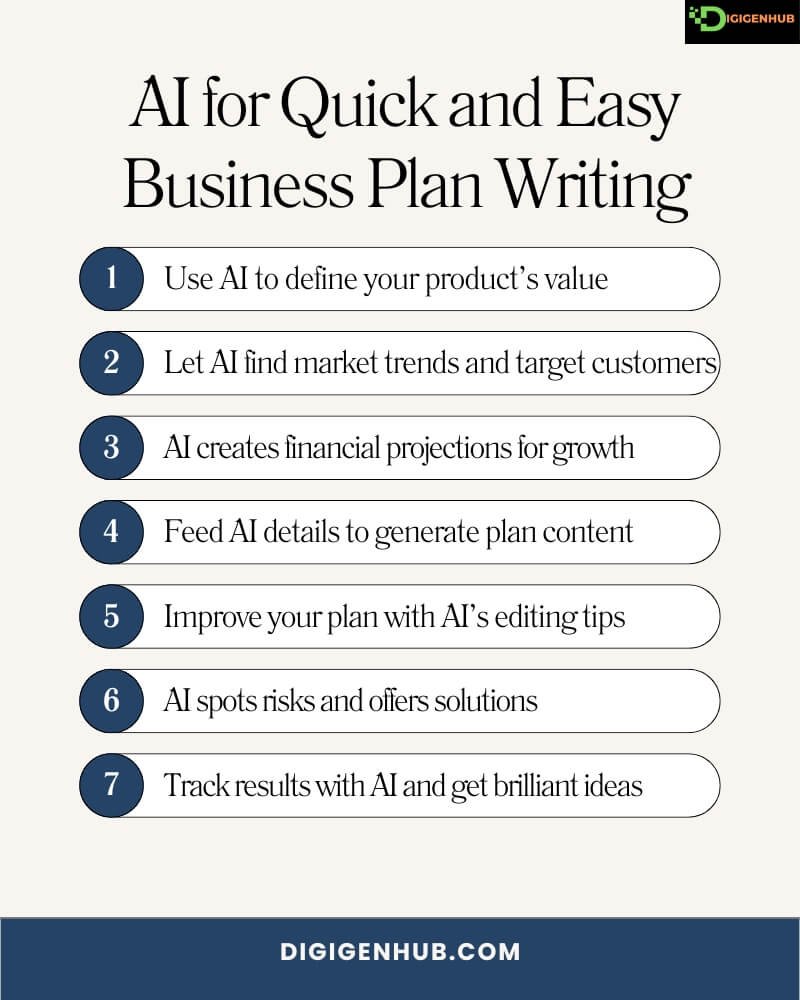
AI can help you define your product, research the market and make financial projections. Let’s walk through how to use AI to write a business plan.
Imagine you want to use AI to write a business plan for a digital product. Let’s learn how to use ai business plan generator to write it:
1. Define Your Digital Product
First, you need to explain what your digital product is. AI can help you define it by asking the right questions to clarify your product’s purpose and uniqueness.
For example, you are launching a mobile app that helps users learn new languages.
How AI helps: AI asks questions like, “What problem does your app solve?” or “What makes your app different?” It helps define your product’s unique value proposition.
2. Conduct Market Research
Next, you need to understand the market and your target audience. AI can gather valuable data about competitors, customer preferences and trends in your industry.
For example, you need to understand the market for language-learning apps.
How AI helps: AI can identify trends, such as “language-learning apps have grown by 20% this year,” and suggest profitable user segments to target.
3. Create Financial Projections
Financial projections are essential to perceiving your business’s potential. AI can automatically generate forecasts based on user growth, subscription models and other important factors.
Example: You estimate $10,000 in startup costs and expect monthly subscription fees for your app.
How AI helps: AI calculates projected revenue, like, “If you gain 500 users per month at $10 each, you’ll generate $5,000 per month by month 6.”
4. Generate Content for Your Business Plan
Writing each section of your plan can be time-consuming. AI can create professional content by taking details and turning them into clear, compelling writing.
Example: You need to write the Executive Summary for your app.
How AI helps: AI generates content like, “Our app helps users learn new languages through personalized lessons and daily challenges,” based on your input.
5. Refining and Editing
After generating content, it’s important to ensure it’s clear and impactful. AI can suggest edits to improve the flow and clarity of your writing.
Example: Your executive summary says, “Our app teaches languages online.”
How AI helps: AI suggests changes like, “Our app offers a personalized language-learning experience that adapts to each user’s pace.”
6. Risk Assessment
Every business faces risks and identifying them early can help you plan. AI can assess potential challenges like competition or market trends.
Example: You’re concerned about competition from well-established apps like Duolingo.
How AI helps: AI identifies risks like market saturation and suggests ways to address them, like focusing on niche languages or offering exclusive offline features.
7. Formatting and Finalizing
Once the content is ready, your plan needs to look polished. AI can automatically format your business plan into clear, professional sections and add graphs or charts.
Example: You want your business plan to look professional.
How AI helps: AI formats your plan into sections like Market Analysis, Financial Projections and Marketing Strategy and adds visuals.
8. Getting Feedback
It’s always a good idea to get feedback from others before finalizing. AI can analyze this feedback and suggest changes to improve your business plan.
Example: You send your business plan to a mentor for feedback.
How AI helps: AI highlights important feedback and recommends edits, like clarifying your revenue model or expanding on pricing details.
9. Tracking and Revising
After launch, tracking your business’s performance is crucial. AI can monitor key metrics and suggest adjustments to improve your results.
Example: Your app launches, but user growth is slower than expected.
How AI helps: AI analyzes data like sign-ups and churn rates and suggests ways to adjust your marketing or improve app features.
Advantages of Using the Best AI Business Plan Generator

Whether you’re starting a new business or growing an existing one, using AI can save you time and effort. Here’s how these tools can help your business succeed.
1. Saves Time
AI tools speed up the process. For example, LivePlan gives you templates and BizPlanBuilder automates financial sections. This helps you finish faster.
2. Improves Organization
AI helps you organize your ideas. Upmetrics offers clear templates and Enloop checks your plan’s structure and gives feedback.
3. Ensures Accuracy
AI tools suggest changes to keep your plan accurate. Rocket Lawyer adds legal sections, while LivePlan checks your financial forecasts.
4. Attracts Investors
A well-organized plan attracts investors. PlanBuildr helps you build a polished plan. IdeaBuddy makes your plan investor-friendly and interactive.
5. Increases Professionalism
AI helps create a professional-looking plan. StratPad gives you design tools. OnePageBizPlan makes a clean, one-page summary.
6. Offers Guidance
AI advises you to improve your plan. Zeni.ai gives personalized tips. IdeaScale offers market insights.
7. Simplifies Financial Planning
AI makes financial planning easy. PlanGuru helps with forecasts. Upmetrics offers financial templates for budgets and cash flow.
8. Accessible
Many tools are free to try. GoSmallBiz has a free version. The score offers free templates and expert tips.
Yet, several paid and free AI business plan generators help businesses stay focused, organized and efficient. Indeed, learn about AI tools that expand growth and create investment chances in the next section.
LivePlan
LivePlan helps you save time, stay organized and create a business plan that attracts investors.
Capabilities:
A . It helps to create a professional business plan step by step.
B . It offers financial forecasting, budgets and cash flow management.
C . Provides templates and guidance for every section.
D . Tracks progress with real-time performance dashboards.
E . Allows collaboration with team members to refine the plan.
User Rating:
4.5/5 from users.
Costs:
Monthly Subscription: $19.95/month.
Annual Subscription: $139.95/year (saves about 30%).
Offers a 60-day money-back guarantee.
Using Method:
First, sign up for an account. Then, enter your business details and follow the easy steps. LivePlan helps you fill in each part of your plan, like your budget and goals. You can review and make changes as needed. It also shows how your business is doing with real-time tracking. Share your plan with your team to improve it together.
BizPlanBuilder
BizPlanBuilder helps you create a detailed business plan with ease.
Capabilities:
A . Provides templates for all sections of your business plan.
B . It includes financial forecasting tools like balance sheets, cash flow and profit & loss.
C . Offers step-by-step guidance and tutorials.
D . Helps you present your plan with professional designs.
E . Allows collaboration with partners or advisors.
User Rating:
4.3/5 from users.
Costs:
One-time purchase: $99.95 for the full version.
Offers a 30-day money-back guarantee.
Using Method:
Sign up and open the tool. Use the templates to fill in each part of your business plan. BizPlanBuilder guides you through the process, including financial forecasts. You can design your plan professionally and share it with your team or advisors for feedback.
Enloop
Enloop helps you write a business plan quickly and efficiently.
Capabilities:
A . Offers automatic business plan generation based on your input.
B . Provides financial forecasting and performance scores to help you measure progress.
C . Includes customizable templates to suit different business needs.
D . Tracks your business plan’s strength with an auto-score feature.
E . Allows collaboration with team members for plan development.
User Rating:
4.1/5 from users.
Costs:
Free Version: Limited features.
Pro Version: $19.95/month with more advanced tools and features.
Offers a 7-day free trial for the Pro version.
How to Use Enloop:
Sign up and input your business information. Enloop automatically generates your business plan and financial forecasts. Customize templates and track your plan’s progress with the auto-score feature. Share your plan with your team to improve it.
Upmetrics
Upmetrics helps you build a business plan with simple tools and clear guidance.
Capabilities:
A . Offers easy-to-use templates to create a business plan step by step.
B . Includes financial planning tools like cash flow, balance sheets and forecasts.
C . Allows collaboration with team members to refine the plan.
D . Provides visual dashboards to track progress and milestones.
E . Offers a roadmap for your business goals and strategies.
User Rating:
4.5/5 from users.
Costs:
Free Version: Includes basic features for simple plans.
Paid Version: Starts at $10/month for additional features and tools.
Offers a 7-day free trial for the paid version.
How to Use Upmetrics:
Sign up and use the templates to build your business plan step by step. Enter your financial details using the cash flow and balance sheet tools. Track your progress with visual dashboards and share your plan with your team.
StratPad
StratPad helps you create a professional business plan with step-by-step guidance.
Capabilities:
A . Offers easy-to-follow templates for creating business plans.
B . Includes financial forecasting tools like cash flow, profit & loss and budgets.
C . Helps you set goals and track your progress with clear reports.
D . Guides creating marketing strategies and operations plans.
E . Allows collaboration with team members or advisors.
User Rating:
4.4/5 from users.
Costs:
Basic Plan: $19.95/month for essential features.
Premium Plan: $29.95/month for full features, including advanced reports.
Offers a 7-day free trial for both plans.
How to Use StratPad:
Sign up and use the templates to create your business plan. Enter financial details using tools for cash flow, profit & loss and budgets. Set goals, track progress and develop marketing and operations strategies. Collaborate with your team or advisors.
Score
Score offers free business plan templates and expert advice to help you get started.
Capabilities:
A . Provides free business plan templates for various industries.
B . Offers expert mentorship from experienced business professionals.
C . Includes financial tools to create projections, budgets and cash flow.
D . Guides you through the entire process with simple instructions.
E . Offers webinars and workshops for further learning.
User Rating:
4.6/5 from users
Costs:
Free: All services, templates and resources are available at no cost.
Offers additional paid workshops and mentoring for advanced support.
How to Use Score:
Visit the website and choose from free business plan templates. Use financial tools to create projections and budgets. Follow simple instructions to complete your plan and get expert advice. Attend free webinars and workshops for extra learning.
PlanBuildr
PlanBuildr helps you create a custom business plan with simple tools and easy steps.
Capabilities:
A . Offers a step-by-step business plan builder with customizable templates.
B . Includes financial tools for budgeting, forecasting and profit & loss statements.
C. Provides pre-written content for common business sections, saving you time.
D . Allows collaboration with team members to refine your plan.
E . Offers progress tracking and performance reporting.
User Rating:
4.3/5 from users.
Costs:
Basic Plan: $29/month for essential features.
Pro Plan: $49/month for advanced tools and additional features.
Offers a 7-day free trial.
How to Use PlanBuildr:
Sign up and follow the step-by-step process to create your custom business plan. Use customizable templates and financial tools for budgeting and forecasting. You can track progress, collaborate with your team and refine it.
Rocket Lawyer
Rocket Lawyer helps you create a business plan and handle legal documents all in one place.
Capabilities:
A . Offers customizable business plan templates for various industries.
B . Includes tools to create legal documents like contracts and agreements.
C . Provides easy-to-use financial tools for budgeting and forecasting.
D . Allows access to professional legal advice for your business.
E . Lets you store and manage documents in one secure location.
User Rating:
4.2/5 from users.
Costs:
Free Trial: 7-day free trial for all features.
Monthly Subscription: $39.99/month for ongoing access to tools and legal advice.
Offers discounted rates for annual plans.
How to Use Rocket Lawyer:
Sign up and choose from customizable business plan templates. Use the financial tools for budgeting and forecasting. You can also create legal documents and get professional legal advice. Store and manage all your documents in one secure place.
IdeaBuddy
IdeaBuddy helps you turn your ideas into a structured business plan with easy steps.
Capabilities:
A . Offers a simple step-by-step process to create your business plan.
B . Includes financial planning tools for budgeting, forecasts and cash flow.
C . Helps you visualize your business model with easy-to-understand diagrams.
D . Guides to refine your ideas and strategies.
E . Allows collaboration with team members for feedback and input.
User Rating:
4.4/5 from users.
Costs:
Basic Plan: Free for basic features.
Pro Plan: $9.99/month for more advanced tools and templates.
Offers a 7-day free trial for the Pro version.
How to Use IdeaBuddy:
Sign up and follow the step-by-step process to turn your ideas into a business plan. Use financial tools for budgeting and forecasting. Visualize your business model with easy diagrams. Collaborate with your team for feedback and improvement.
GoSmallBiz
GoSmallBiz helps small business owners create plans and manage their businesses with ease.
Capabilities:
A . Offers customizable business plan templates tailored to small businesses.
B . Includes tools for budgeting, forecasting and financial planning.
C . Provides legal documents, contracts and HR resources.
D . Offers business coaching and expert advice for growth and strategy.
E . Tracks business performance with real-time reporting tools.
User Rating:
4.3/5 from users.
Costs:
Monthly Subscription: $29.95/month for full access to tools and resources.
Annual Subscription: $299/year (saves about 15%).
Offers a 30-day money-back guarantee.
How to Use GoSmallBiz:
Sign up and choose a customizable business plan template. Use tools for budgeting, forecasting and financial planning. Access legal documents and HR resources. Track your business performance with real-time reports and get expert coaching for growth.
Palo Alto Software
Palo Alto Software offers business planning tools that help you create detailed plans and grow your business.
Capabilities:
A . Provides easy-to-use templates for creating business plans.
B . Includes financial forecasting tools like cash flow, balance sheets and profit & loss statements.
C . Allows you to track your progress with built-in performance dashboards.
D . Offers additional resources for pitch decks and investor presentations.
E . Helps you create a clear roadmap with goals and strategies for growth.
User Rating:
4.5/5 from users.
Costs:
LivePlan: $19.95/month or $139.95/year (for full access to features).
Offers a 60-day money-back guarantee for new users.
How to Use Palo Alto Software:
Sign up and use the templates to create your business plan. Enter financial data for cash flow, balance sheets and profit & loss. Track your progress with performance dashboards. Use additional tools for pitch decks and investor presentations.
OnePageBizPlan
OnePageBizPlan helps you create a simple, clear business plan on a single page.
Capabilities:
OnePageBizPlan offers a streamlined, one-page business plan template.
Focuses on key areas like goals, strategies, financials and milestones.
Helps you create a concise and easy-to-understand plan for your business.
Ideal for startups and small businesses that need a quick, clear plan.
Allows for quick updates and easy presentation to investors or partners.
User Rating:
4.2/5 from users.
Costs:
Basic Plan: $29.95 (one-time payment for the template).
Pro Plan: $99.95 (includes extra features like financial tools and customization).
Offers a 30-day money-back guarantee.
How to Use OnePageBizPlan:
Sign up and use the one-page template to create a simple business plan. Focus on key areas like goals, strategies and financials. Update your plan easily and present it clearly to investors or partners.
PlanGuru
PlanGuru helps you create detailed business plans with strong financial tools and projections.
Capabilities:
A . Offers financial planning tools, including budgeting, forecasting and cash flow analysis.
B . Allows you to create business plans with detailed financial statements.
C. Provides reports that help you track business performance and set goals.
D . Offers multi-year financial projections for long-term planning.
E . Integrates with accounting software like QuickBooks for easy data import.
User Rating:
4.4/5 from users.
Costs:
Basic Plan: $99/year for essential tools and features.
Pro Plan: $199/year for full access to advanced features and multi-user support.
Offers a 30-day free trial.
How to Use PlanGuru:
Sign up and use financial tools for budgeting, forecasting and cash flow analysis. Create detailed business plans with financial statements and multi-year projections. Track performance with reports and integrate with QuickBooks for easy data import.
IdeaScale
IdeaScale helps you gather ideas and feedback to create a more effective business plan.
Capabilities:
A . Allows you to crowdsource ideas from employees, customers, or stakeholders.
B . Helps you collect, manage and evaluate feedback for better decision-making.
C . Offers tools to prioritize ideas and align them with business goals.
D . Provides reporting features to track and analyze trends and suggestions.
E . Allows collaboration with team members to refine and develop new ideas.
User Rating:
4.3/5 from users.
Costs:
Basic Plan: Free for small teams with limited features.
Pro Plan: Starts at $2,400/year for more advanced tools and support.
Offers a free demo to explore the platform.
How to Use IdeaScale:
Sign up and gather ideas from employees, customers, or stakeholders. Use tools to prioritize and align ideas with your business goals. Track trends, analyze feedback and collaborate with your team to refine strategies.
Zeni.ai
Zeni.ai helps you create a business plan by automating financial management and providing smart insights.
Capabilities:
A . Automates your accounting and financial planning.
B . Offers real-time financial insights, budgeting and forecasting tools.
C . Helps you create business plans with data-driven financial projections.
D . Integrates with various accounting and business tools for seamless management.
E . Provides personalized insights and recommendations to improve your business strategy.
User Rating:
4.7/5 from users.
Costs:
Custom Pricing: Pricing is based on business size and needs (contact for quote).
Offers a free demo and consultation to get started.
How to Use Zeni.ai:
Sign up and automate your accounting and financial planning. Use real-time insights, budgeting and forecasting tools. Create data-driven financial projections and get personalized recommendations to improve your strategy.
Conclusion
Thus, AI helps you write a business plan quickly. It defines your product, researches the market and creates financial projections. AI generates content, refines it and formats it. It also highlights risks and suggests ways to improve. After launch, AI tracks performance and gives advice. AI saves time, improves accuracy and makes your plan look professional. It’s a great tool for creating a solid, investor-friendly plan.
FAQ
How much does a 15 minute plan AI cost?
A 15-minute AI business plan typically costs between $10 and $50, measuring the tool’s sublimity. Some platforms charge per use, while others may offer shorter trials or pay-as-you-go options.