


Finding the right desk for computers is no longer just about picking a flat surface. It is about building a personal command center for your health, work and focus.
Choosing the right desk for your computer can significantly improve your productivity. Focus on ergonomics, size and functionality.
L-shaped designs maximize corner space, while electric standing desks improve long-term health.
Look for essential features like built-in power outlets, deep surfaces for monitors and smart cable management.
Whether for gaming or remote work, the perfect setup reduces eye strain and eliminates clutter. Always measure your room’s dimensions first to ensure a comfortable and pain-free workflow.
The Best Desk for Computers
We now see a massive demand for “Active Workstations”—desks that accommodate walking pads. These support dual monitors without wobble and hide the mess of cables.
I have tested and analyzed dozens of setups to help you navigate these changes. Let’s judge the top desks that solve specific modern problems, from small-space living to heavy-duty ergonomic needs.
Computer Desks Comparision Chart
| Desk Model | Best For | Type | Size | Key Feature |
| Huuger 47 Inch | Overall Value | Standard with Storage | 47″ x 19.7″ | 4 Fabric Drawers & LED Lights |
| Huuger 55 x 28 Electric | Ergonomics | Sit-to-Stand | 55″ x 28″ | Deep Desktop (27.6″) |
| Furologee L Shaped | Corner Spaces | L-Shaped | 50″ (Reversible) | Built-in File Drawer & Power |
| Veken 63 Inch Electric | Heavy Setups | Sit-to-Stand | 63″ x 28″ | Extra Width for 3 Monitors |
| TIQLAB Small Corner | Small Bedrooms | Compact L-Shaped | 40″ x 27.5″ | Reversible Shelves & Power |
| Folding Desk 31.5″ | Flexibility | Foldable | 31.5″ x 15.7″ | No Assembly Required |
1. Huuger 47 Inch Computer Desk with Power Outlets
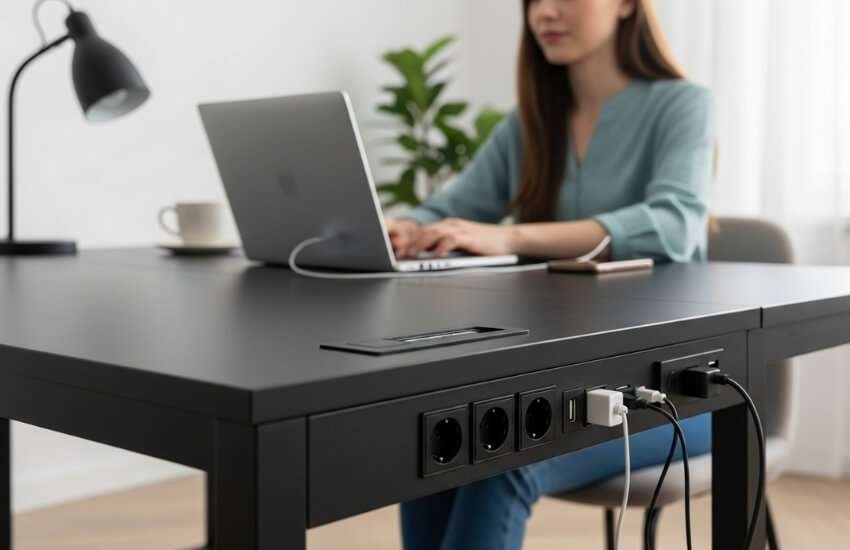
Best for: Users who require maximum storage in a compact footprint.
The Huuger 47-inch desk bridges the gap between a “gaming” setup and a professional office. It stands out because it addresses the biggest issue with modern, affordable desks: a lack of storage.
While most desks consist of just legs and a top, this unit incorporates four fabric drawers and a dedicated monitor shelf.
It also includes a built-in power strip (4 outlets, 2 USB ports) right on the desktop. This saves you from having to crawl on the floor to plug in your laptop.
My Personal Experience
I found the monitor stand to be a great aid in maintaining good posture. It raises your screen to eye level, which naturally straightens your back.
The LED lights are subtle enough for office work but can be ramped up for a gaming vibe at night.
The fabric drawers are surprisingly rigid. This can hold a substantial amount of weight—perfect for notebooks, controllers and other random tech accessories that often clutter the surface.
Pros:
Integrated Power: Charge your phone, tablet and laptop simultaneously on the desk.
Storage King: Four drawers keep the surface completely clear of clutter.
Ergonomic Shelf: No need to buy a separate monitor riser.
Cons:
Assembly Time: The assembly requires multiple parts. So expect to spend approximately an hour putting it together.
Drawer Material: Fabric drawers are durable but not as secure as locking wood/metal drawers.
2. Huuger 55 x 28 Large Electric Standing Desk
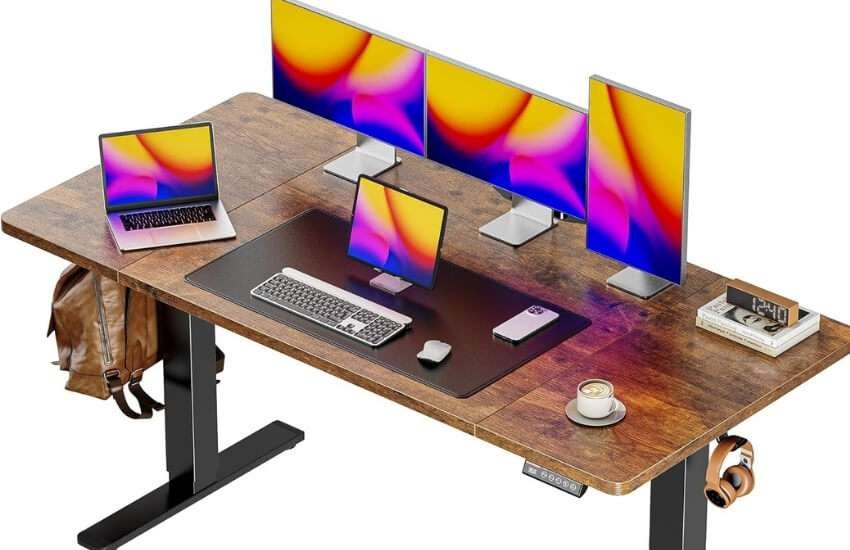
Best For: Professionals who want a deep workspace and “Active Work” capability.
If you have ever felt your monitor is too close to your face, this is the solution.
Most standing desks are only 24 inches deep, but this Huuger model offers a 28-inch depth.
That extra 4 inches makes a massive difference for keyboard placement and eye relief.
It features a quiet motor that lifts up to 220 lbs. This quality makes it sturdy enough to handle a heavy PC tower and dual monitors while you switch between sitting and standing.
My Personal Experience
This desk is my top recommendation for anyone using an under-desk treadmill or walking pad.
The cross-bar removal in the design means you won’t kick the frame while walking.
The 3 memory presets are essential—I set one for sitting, one for standing and one for “walking” (which is usually slightly higher).
The rustic brown finish also looks much more expensive than it actually is.
Pros:
Deep Surface: 27.6″ depth is superior for viewing distance and wrist support.
Quiet Motor: Operates under 45dB. So you won’t disturb family members during late-night adjustments.
Walking Pad Ready: Open leg design accommodates treadmills easily.
Cons:
Heavy Box: You might need help moving the package inside before assembly.
Cable Management: Although it features grommets, you will need to purchase sticky clips to conceal wires beneath the moving top.
3. Furologee L Shaped Computer Desk (50 Inch)
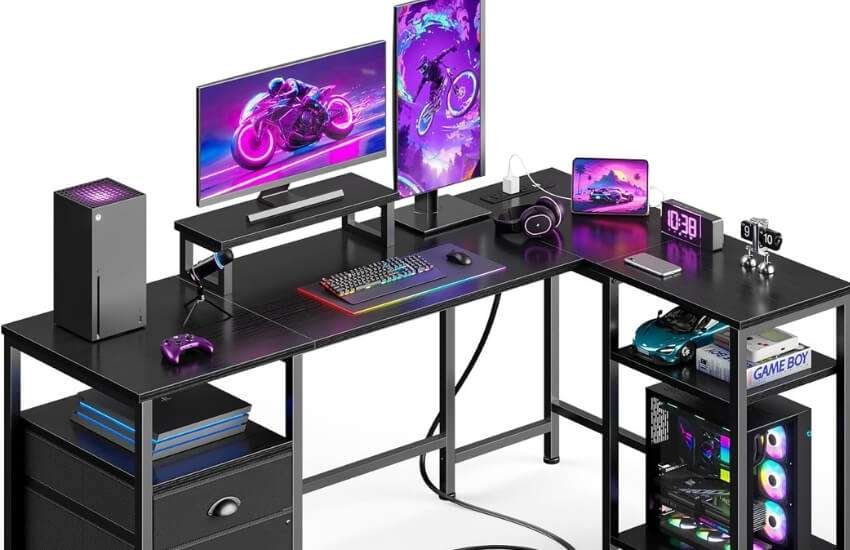
Best For: Maximizing dead corner space with a professional look.
The Furologee L-shaped desk is designed for people who need to separate their “computer life” from their “paperwork life.”
The L-shape gives you two distinct zones. Unlike many flimsy L-desks, this one includes a dedicated file drawer and rigid metal shelving.
It is also reversible, meaning you can install the longer side on the left or right, depending on your room’s layout.
My Personal Experience
I love the versatility here. In testing, I placed a printer on the side shelf and my main monitor on the riser.
The 50-inch size is the “Goldilocks” zone—large enough not to feel cramped, but compact enough to fit in a standard bedroom corner.
The built-in power outlet on the top surface is a nice touch for plugging in a lamp or charging a phone without using a wall adapter.
Pros:
Reversible Layout: Fits any corner configuration.
Dedicated File Drawer: rare feature at this price point; great for organizing documents.
Monitor Riser: Spanning the main desk area, it increases usable surface space.
Cons:
Leg Room: The shelves under the desk can slightly restrict leg movement if you swivel your chair too far to the side.
4. Veken 63 x 28 Inch Electric Standing Desk
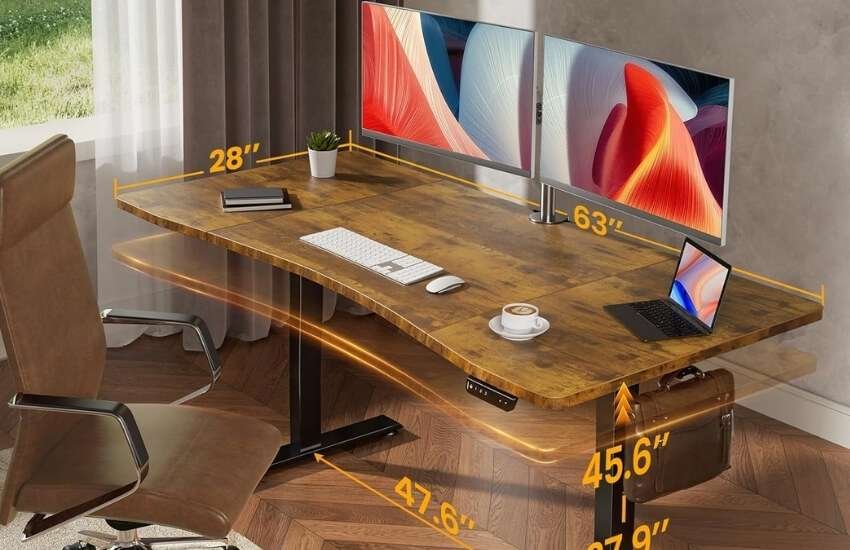
Best For: Power users with 3 monitors or heavy equipment.
Size matters when you are multitasking. The Veken 63-inch is a beast. It offers a massive surface area that can easily accommodate three 24-inch monitors side by side.
It features a splice board design (the top comes in pieces). This makes shipping easier; however, once assembled, the frame is rock solid.
It supports sit-stand functionality with 4 memory presets, one more than the standard 3 found on most desks.
My Personal Experience
For video editors or traders who need screen real estate, this is the one. I was able to put a heavy desktop tower, two monitors and a laptop on it and the motor lifted it without groaning.
The stability at full height (standing mode) is impressive. There is very little wobble when typing aggressively, which is a common failure point in cheaper standing desks.
Pros:
Massive Width: 63 inches provides ample room for complex setups.
Stability: High-grade steel frame prevents the “monitor shake” when standing.
4 Memory Keys: Allows for more custom height settings (e.g., Sitting, Standing, Walking, Gaming).
Cons:
Splice Top: The desktop has a seam running through it (usually covered by a large mousepad), which some purists might dislike.
5. TIQLAB Small L Shaped Computer Gaming Corner Desk (40 Inch)
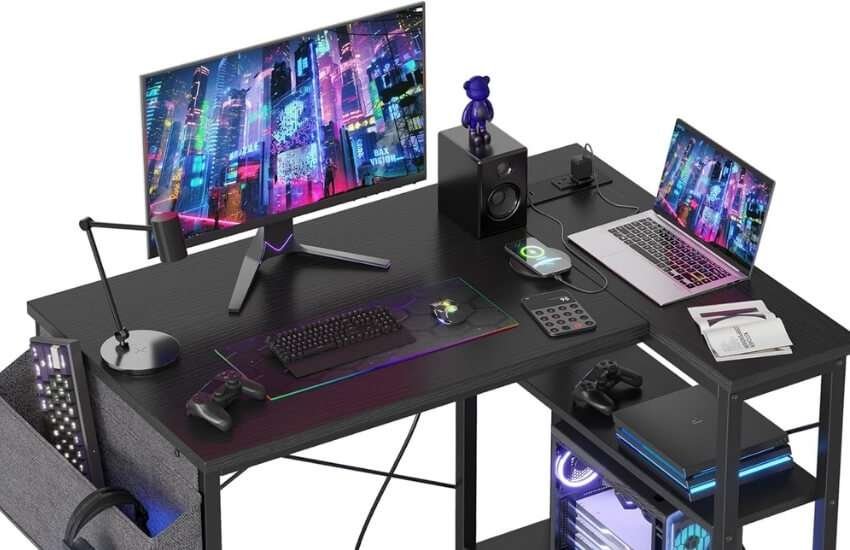
Best for: dorms, small apartments and tight spaces.
Not everyone has a dedicated office. The TIQLAB 40-inch desk is an engineering marvel for small spaces.
It takes up minimal floor footprint but provides an L-shaped workflow. It features reversible shelves and built-in power outlets.
This makes it a fully functional workstation that fits into a closet-sized space if needed.
My Personal Experience
I recommend this specifically for students or renters. It is incredibly lightweight but stable due to the X-brace design.
You can comfortably fit a laptop and a 24-inch monitor on it. The power strip on top is a huge convenience feature in older apartments where wall outlets are scarce or hard to reach behind furniture.
Pros:
Space Saver: fits where no other L-desk can.
Reversible Shelves: Can be set up to clear obstacles, such as baseboard heaters or bed frames.
Value: Extremely affordable way to get a “proper” desk setup.
Cons:
Monitor Limit: really only suitable for one large monitor or a laptop + small screen setup.
6. Folding Desk – 31.5″ Wood Top
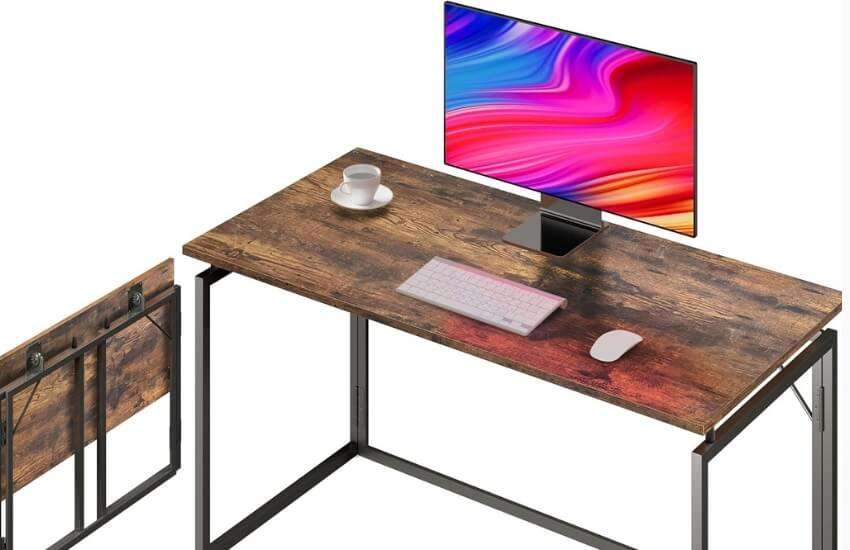
Best for: Minimalists, temporary setups and individuals who dislike assembly.
Sometimes you just need a table and you need it now. This Folding Desk requires literally zero assembly.
You take it out of the box, unfold the metal frame and snap the top on. It is sturdy enough to hold a heavy gaming laptop and a mouse.
Yet light enough to carry to a different room or slide under a bed when not in use.
My Personal Experience
This is the ultimate “emergency office” or side-table solution. I have used this as a secondary desk for recording videos and then folded it away when guests came over.
The metal legs are surprisingly thick and it doesn’t wobble like a TV tray. If you frequently move apartments, this desk is a dream because it packs flat in seconds.
Pros:
No Assembly: Ready to use in 30 seconds.
Portable: Easy to store in a closet or under a sofa.
Durable Top: Waterproof and scratch-resistant surface.
Cons:
Basic: No drawers, no power outlets, no shelves. It is strictly a surface.
Which Desk Type Fits Your Workflow?
Choosing the shape of your desk is the first big decision. It dictates how you will interact with your room.
The L-Shaped Advantage
An L-shaped desk is the best tool for separation. You can keep your computer setup on one “wing” and use the other for writing, sketching, or eating.
It effectively doubles your reachable workspace without taking up double the wall length. This is perfect for corners that usually collect dust.
The Straight (Standard) Desk
This is the classic choice. It is easier to position in a room—you can push it against a wall or float it in the middle of the room.
Straight desks force you to be more organized because you have less horizontal space to spread out “junk.”
The Standing Desk Revolution
Sitting for 8 hours is considered the new smoking. A standing desk isn’t just for health; it keeps you awake.
The ability to hit a button and stand up during a boring meeting instantly changes your energy levels. If you work from home full-time, this is the most valuable upgrade you can make.
Material Matters: Durability vs. Aesthetics
Not all wood is created equal. Understanding what you are buying prevents disappointment later.
Engineered Wood (MDF/Particle Board)
Most affordable desks use this. It is lightweight and smooth. The downside is that it hates water. If you leave a cold drink sweating on the surface without a coaster, it will bubble over time. However, modern high-quality veneers (like on the Huuger desks) are much more resistant than they used to be.
Metal Frames
Always look for “powder-coated” steel. This finish resists rust and scratches. A desk with a metal frame will always be more stable than one made entirely of wood.
It also handles moving days much better—you can disassemble and reassemble it multiple times without the screw holes stripping.
Glass Tops
Glass looks beautiful and modern. It makes small rooms feel bigger because it doesn’t block visual space.
However, be warned: glass reveals every fingerprint and dust particle. It also limits your ability to use clamp-on monitor arms, as the pressure can cause the surface to crack.
Essential Features
When purchasing a desk for your computer, look for these specific quality-of-life enhancements.
Integrated Power
We live in a device-heavy world. Having a power strip built into the desktop is a game-changer.
It means you can plug in a soldering iron, a phone charger, or a camera battery immediately without having to dive under the table.
Cable Management
A messy desk increases anxiety. Look for desks with “grommets” (the little round holes in the corners).
Even better, look for desks with a tray underneath. If your chosen desk doesn’t have one, buying a cheap wire basket to mount underneath is a mandatory upgrade.
Monitor Shelves
A built-in monitor riser does two things. First, it puts your screen at eye level to save your neck.
Second, it creates a “cubby” underneath for your keyboard and mouse. This allows you to reclaim your desk surface for writing when you aren’t typing.
Ergonomics: The Invisible Productivity Booster
Your desk height can significantly impact your pain levels. Here is the rule of thumb: when you sit, your elbows should be at a 90-degree angle.
The Height Problem
Most standard desks are 29 or 30 inches tall. For many people (especially those under 5’9″), this is too high.
This causes you to shrug your shoulders, leading to neck tension. This is why adjustable standing desks are so superior—you can lower them to 27 or 28 inches for perfect typing posture.
Depth is Key
A shallow desk forces you to sit too close to your screen. This causes eye strain. If you use a large 32-inch monitor, you absolutely need a desk that is at least 26 to 28 inches deep.
This distance allows your eyes to focus comfortably and provides room for your forearms to rest.
Final Thoughts
Building a workspace is a personal journey. The best desk is the one that disappears while you work. This means it doesn’t wobble, it doesn’t cramp your arms and it puts everything you need within reach.
Don’t rush the decision. Measure your room twice. Measure the dimensions on your floor if necessary.
FAQ
Is a curved desk better than a straight one?
Yes, for accessibility. A curved “cockpit” style desk brings the edges of the workspace closer to you, so you don’t have to lean forward to reach items on the far left or right.
How much weight should a computer desk support?
Aim for at least 150 lbs. A heavy gaming PC can weigh 40 lbs alone. Add two monitors, books and the weight of your own arms leaning on it. Also, you need that stability.
Can I use a TV as a computer monitor on these desks?
Yes, but check the depth. A TV is usually larger than a monitor, so you need a deeper desk (28 inches or more) to ensure you aren’t sitting too close to the pixels.
Do standing desks wobble when extended?
Cheap ones do. Look for models with “T-style” legs or wider feet (like the Veken). The more weight the frame has at the bottom, the less it will shake at the top.
How do I clean an engineered wood desk?
Use a damp microfiber cloth. Avoid harsh chemicals or soaking wet sponges, as water can seep into the seams and cause the wood to swell.
Are keyboard trays still necessary?
Only if your desk is too tall. If you have a height-adjustable desk, a keyboard tray is redundant because you can just lower the entire desk to the correct typing height.
Can I add wheels to these desks?
Many metal-frame desks allow you to screw in standard M8 caster wheels. Check the thread size of the wheels’ feet before purchasing.
Is a glass desk safe for a heavy PC tower?
I typically advise against placing a heavy tower directly on glass. It is safer to put the tower on the floor or a separate stand and keep only the monitors on the glass.
How do I hide cables on a desk with open legs?
Use velcro ties to strap cables to the back of the metal legs. This makes the wires “invisible” from the front.