


You spend thousands on a fast PC and a crisp monitor. But you are likely still using the tinny, hollow speakers built into your screen or laptop. I have witnessed this mistake occur during my time testing tech hardware. Great visuals mean nothing if the sound is flat.
So, upgrading to dedicated computer speakers is the single most effective change you can make. Whether you are editing video, trying to hear footsteps in a game, or just want clear vocals on a Zoom call, you need it.
Indeed, you don’t need a giant amplifier to get good sound. You just need the right active speakers that fit your desk.
What Actually Are Computer Speakers?
A computer speaker is no longer just a plastic box. It is a dedicated audio engine designed for near-field listening.
Near-Field Design
Unlike living room speakers, these are specifically tuned to sound perfect when positioned just 2-3 feet from your ears.
Active Amplification
All modern computer speakers (like the ones below) are “active.” This means the amplifier is built into the device. You don’t need a receiver or extra messy cables. You just plug them into the wall, connect to your PC, and play.
Digital Smarts
New models often include a DAC (Digital-to-Analog Converter). This bypasses your computer’s noisy sound card to deliver static-free, studio-grade audio via USB.
Yet, I have crafted a list for you. You can judge and decide which type of computer speakers to purchase for your setup.
Top 6 Computer Speakers at a Glance
| Product Model | Best For | Power (RMS) | Connectivity | Special Feature |
| Edifier R1280T | Pure Audio Lovers | 42W | RCA (Dual Input) | Classic Wood Build, Warm Sound |
| Sanyun SW208 | Gamers & Style | 60W | BT 5.0, USB | Carbon Fiber Unit, 24-bit DAC |
| Audioengine A2+ | Premium/Compact | 60W (Peak) | BT aptX, USB | High-End Wireless, Built-in DAC |
| Creative Pebble Pro | Minimalists | 30W (Peak) | USB-C, BT 5.3 | RGB Lighting, Clear Dialog Tech |
| PreSonus Eris 3.5 | Content Creators | 50W | TRS, RCA | Studio-Grade “Flat” Tuning |
| OHAYO 60W | Versatile Use | 60W | BT 5.3, RCA, USB | Multi-Input, Hi-Fi Stereo |
1. Edifier R1280T Powered Bookshelf Speakers
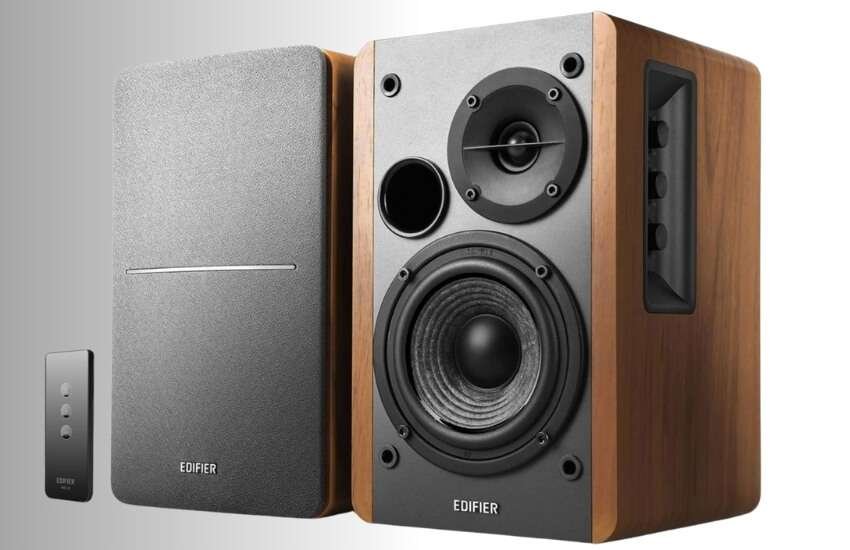
Best For: People who want a classic, warm sound for music and vinyl.
The Edifier R1280T is the gold standard for entry-level high fidelity. Unlike plastic gaming speakers, these utilize a wooden enclosure made of MDF (Medium-Density Fiberboard).
This minimizes acoustic resonance, meaning the sound is solid and clean, not rattling. They are active. So, you simply plug them right into the wall—no extra amp is needed.
I have kept a pair of these on my secondary desk for years. The sound signature is what audiophiles refer to as “warm.”
It’s smooth. You can listen to Spotify or work playlists for eight hours straight without your ears getting tired.
The bass isn’t earth-shattering, but it’s rich and fills a medium-sized room easily. I also love the physical knobs on the side; reaching over to tweak the bass is faster than digging through software menus.
Pros
Wooden build quality feels premium and reduces vibration.
Dual RCA inputs allow for the simultaneous connection of your PC and a record player.
Comes with a simple remote control.
Cons
They are wired only (no Bluetooth).
The footprint is a bit large for small dorm desks.
2. Sanyun SW208 3″ Active Bluetooth 5.0 Speakers
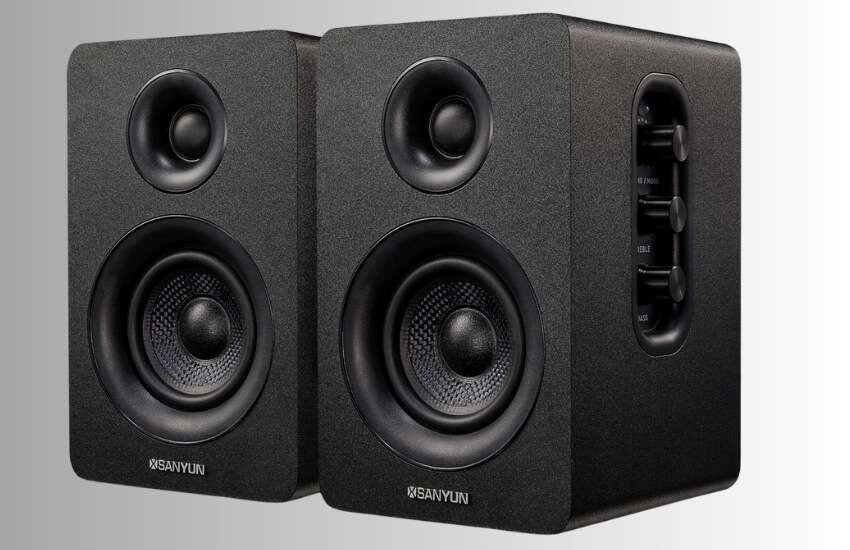
Best For: Gamers who want a modern look without the “toy” aesthetic.
The Sanyun SW208 stands out because of its materials. It uses carbon fiber speaker units. Carbon fiber is light and rigid.
This allows the speaker cone to move very fast. This results in a “snappy” sound. It is perfect for hearing quick sound effects in games or crisp snares in music.
When I tested these with fast-paced shooters, the directional audio was impressive for a 2.0 system.
I could clearly tell which direction the footsteps were coming from. The built-in 24-bit DAC (Digital-to-Analog Converter) is a huge plus.
When I connected via USB, the background hiss I usually hear from my PC’s headphone jack completely vanished. It was dead silent until the music started.
Pros
USB connection provides a static-free digital signal.
Carbon fiber cones have a distinct and high-tech appearance.
Bluetooth 5.0 lets you switch to phone audio instantly.
Cons
Controls are located on top, which can be difficult to reach if you have shelves above your monitor.
The volume knob resets to its original level when you turn it off.
3. Audioengine A2+ Wireless Desktop Speakers
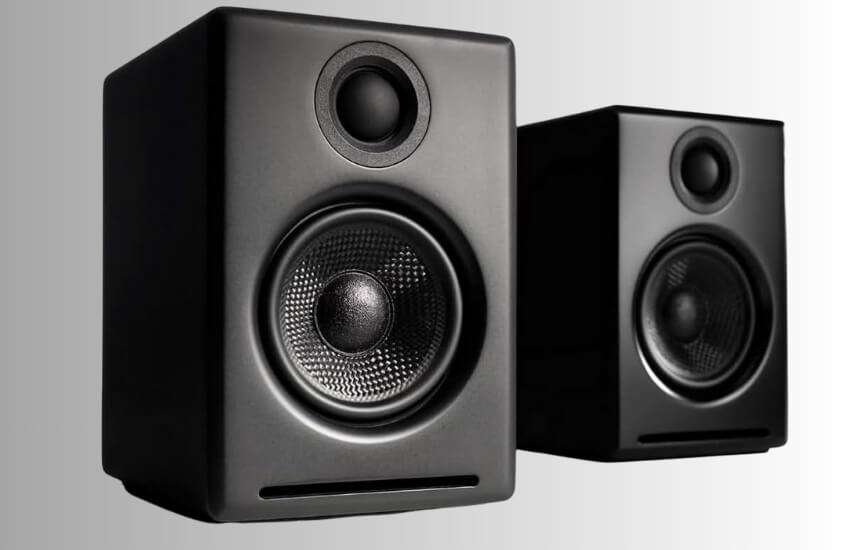
Best For: Small desks that need massive, premium sound.
If you have a big budget but a small desk, this is the answer. The Audioengine A2+ speakers are compact, measuring about the size of a soda can.
Yet they pack incredible technology inside. They feature aramid fiber woofers and silk tweeters, materials typically found in large home theater speakers.
The first time I turned these on, I looked under my desk to see if there was a hidden subwoofer.
The bass these little boxes produce defies physics. They are finished in a high-gloss paint that resembles the finish of a luxury car.
I use the Bluetooth aptX connection to stream high-res audio from my phone when I’m reading at my desk and the connection never drops.
Pros
Incredible sound quality for the small size.
Built-in high-fidelity DAC improves audio from any source.
The subwoofer output allows you to expand the system later if needed.
Cons
Expensive compared to other options.
Glossy finish attracts fingerprints and dust.
4. Creative Pebble Pro (Minimalist 2.0 USB-C)
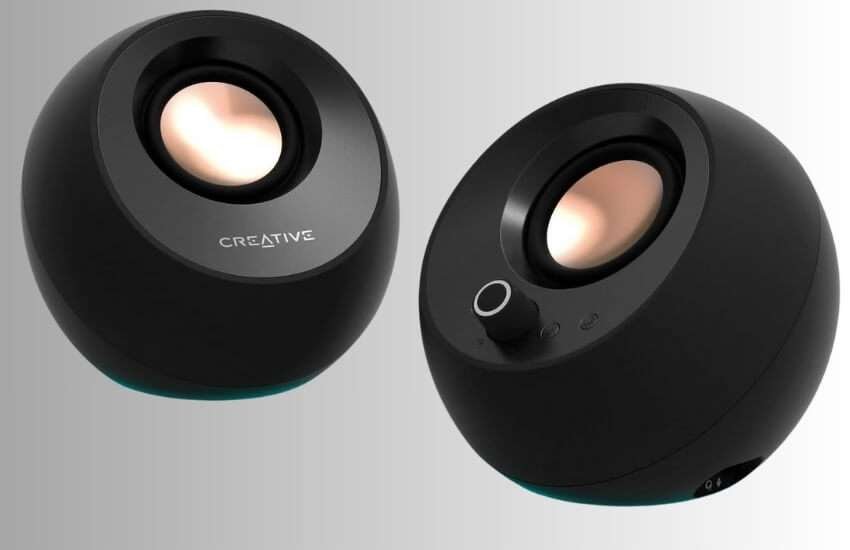
Best For: Minimalists and students who hate cable clutter.
The Creative Pebble series is iconic for its sphere shape. The “Pro” version is now a major upgrade.
It adds RGB lighting at the bottom and significantly more power. They are angled at 45 degrees, firing sound directly at your ears rather than your chest.
I take these with me when I work from different locations. They are lightweight and usually run off a single USB-C cable.
The standout feature for me is the “Clear Dialog” processing. It pulls voices forward in the mix.
If you frequently watch YouTube videos or listen to podcasts while working, this feature makes voices clearer and easier to understand.
Pros
Fits under almost any monitor.
Bluetooth 5.3 is the latest standard for lag-free wireless.
“Clear Dialog” tech is excellent for video calls.
Cons
To achieve the full 30W power, you will need to purchase a separate 30W wall adapter.
The bass is decent for its size, but it lacks a deep, rumbling quality.
5. PreSonus Eris 3.5 Studio Monitors
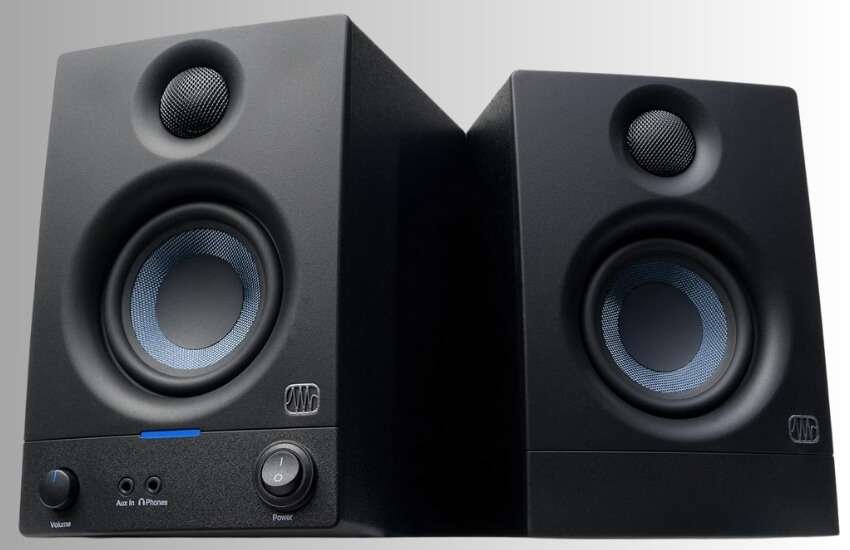
Best For: Video editors, podcasters and content creators.
Note the name: “Studio Monitors.” These are not designed to make music sound “fun” or bass-heavy. They are designed to make it sound accurate. They have a flat frequency response, meaning they play the audio exactly as it was recorded.
I use the PreSonus Eris 3.5 for all my video editing. They are honest. If my microphone audio sounds bad on these, I know I need to fix it.
Other speakers might hide those flaws with boosted bass. If you are starting a YouTube channel or a podcast, these are essential tools. I also appreciate that plugging in headphones on the front automatically mutes the speakers.
Pros
Professional accuracy for editing and mixing.
Acoustic tuning controls on the back to match your room.
Great value for professional-grade gear.
Cons
It can sound “dry” if you are used to bass-boosted party speakers.
The LED power light on the front is quite bright in a dark room.
6. OHAYO 60W Computer Speakers
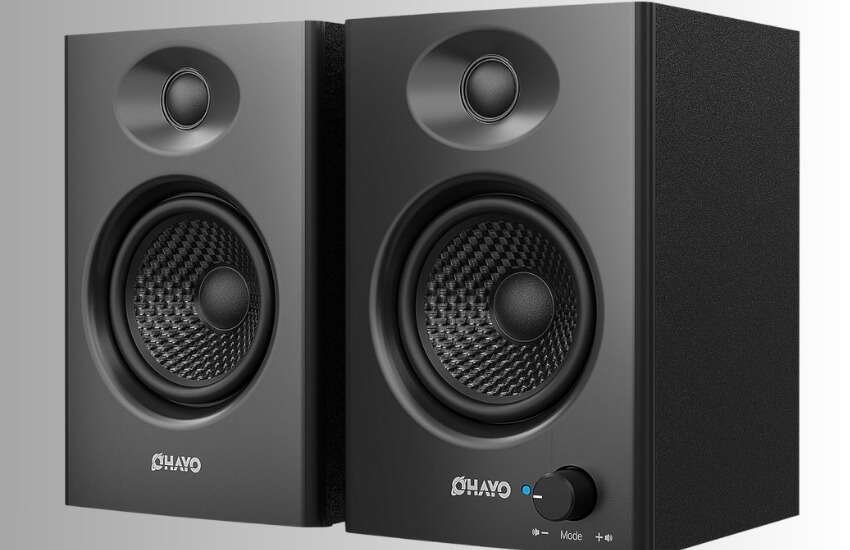
Best For: People who use multiple devices (PC, Console, Phone).
The OHAYO 60W is a versatile all-rounder. It combines the connectivity of modern speakers with the power of traditional ones.
It supports Bluetooth 5.3, USB, Optical and RCA inputs. It’s designed to be the central hub for your entire entertainment setup.
I set these up in a living room/office hybrid space. The convenience is the selling point here.
I could have my PC connected via USB, my PS5 connected via Optical and my phone connected via Bluetooth. Switching between them was seamless. The sound is punchy and loud, perfect for action movies or casual gaming sessions.
Pros
Huge range of input options (Optical is rare at this price).
Bluetooth 5.3 ensures no audio lag when watching movies.
Comes with a remote for easy switching.
Cons
The design is a bit blocky and utilitarian.
High treble notes can sound a bit sharp at maximum volume.
Why You Actually Need Dedicated Speakers
You might think your headphones are enough, but speakers offer benefits that headphones can’t match.
Soundstage and Immersion
Good speakers create a “phantom center.” When you sit between them, the voice sounds like it is coming from the middle of your screen, not from the speakers. This immersion helps you become fully immersed in your work or game.
Ear Health
Wearing headphones for 8 hours a day traps heat and moisture. This leads to fatigue. Speakers let your ears breathe.
Social Sharing
You can’t share a funny video with someone standing next to you if you are wearing headphones. Speakers make your computer a shared social experience.
What to Look For to Avoid Mistakes
Before you buy, check these three specific things to ensure you don’t waste money.
1. Check the “Active” Label
Ensure the speakers are Active or powered. This means the amplifier is built-in. If you buy “Passive” speakers, you will need to buy a separate amplifier, which costs more money and takes up desk space. All the options I listed above are Active.
2. Measure Your Desk Depth
Speakers like the Edifier R1280T are deep (about 9.5 inches). If you have a shallow desk, they might push your monitor too close to your face. For shallow desks, stick to the Creative Pebble Pro or Audioengine A2+.
3. The Triangle Rule
This isn’t a purchase tip, but a usage tip. For the speakers to sound right, they must form an equilateral triangle with your head. If they are just pointing straight at your chest, you are losing high-frequency detail. Angle them in toward your ears.
Conclusion
Ultimately, your computer setup should be a space where you genuinely enjoy spending time. We often get so caught up in work deadlines or competitive gaming stats that we forget the simple pleasure of just listening. Upgrading your audio isn’t just about “better specs.” It is about rediscovering your favorite music. Movies feel more real. It is a simple upgrade that brings daily joy. So, don’t overthink it. Just plug in and hit play. Your ears will thank you.
FAQ
Do I need a subwoofer for computer speakers?
Not necessarily. A good 2.0 system (two speakers) provides enough bass for most music. You only really need a subwoofer (2.1 system) if you want to feel the floor shake during explosions in movies or games.
What is the difference between active and passive speakers?
Active speakers have a built-in amplifier and plug directly into the wall. Passive speakers need a separate external amplifier. Active speakers are much easier to integrate into computer setups.
Does USB audio sound better than the 3.5mm jack?
Yes, usually. USB maintains the signal in a digital format until it reaches the speaker, thereby avoiding the electrical noise and static often found within a computer case.
Can I connect these speakers to my phone?
Yes, if you choose a model with Bluetooth like the Sanyun SW208, OHAYO 60W, or Creative Pebble Pro. You can easily switch between PC and phone audio.
How do I stop my speakers from buzzing?
Buzzing is often caused by a “ground loop” when sharing a power source with your PC. Try plugging the speakers into a separate wall outlet or using a different USB power brick.
Are expensive speakers like Audioengine worth it?
If you listen to high-quality music files and sit at your desk for hours, yes. The clarity and build quality are noticeable. For casual YouTube watching, budget options are fine.
Do studio monitors like PreSonus work for gaming?
They work great, but they sound “flat.” They won’t boost the bass of explosions like gaming speakers do. Some gamers prefer this accuracy; others miss the rumble.
What is Watts RMS and does it matter?
RMS (Root Mean Square) measures continuous power. Higher RMS means the speaker can play louder without distorting. Ignore “Peak Power”—it is a marketing number. 40W RMS is more than enough for a desk.
Can I use these speakers with a TV?
Yes, as long as your TV has an RCA (red/white) or headphone output. However, since these are near-field speakers, they may not effectively fill a large living room.
How long do computer speakers last?
Quality speakers like Edifier or Audioengine can last 10-15 years easily. Unlike phones or laptops, audio technology doesn’t become obsolete very quickly.