A strong Google product feed drives Shopping and Performance Max campaigns. One feed reaches Search, YouTube, Display, Discover, Gmail and Maps.
So, your titles, GTINs, categories and prices must be accurate. Better feeds lift your CTR from 2.0% to 2.6%. This raises conversions by 30%. Otherwise, missing information can cut your clicks by 12–20%.
US sales tax fields are gone. Supplemental feeds add seasonal or promo labels. Custom labels increase ROAS 20–35%.
How Google Product Feed Powers Shopping & PMax Campaigns
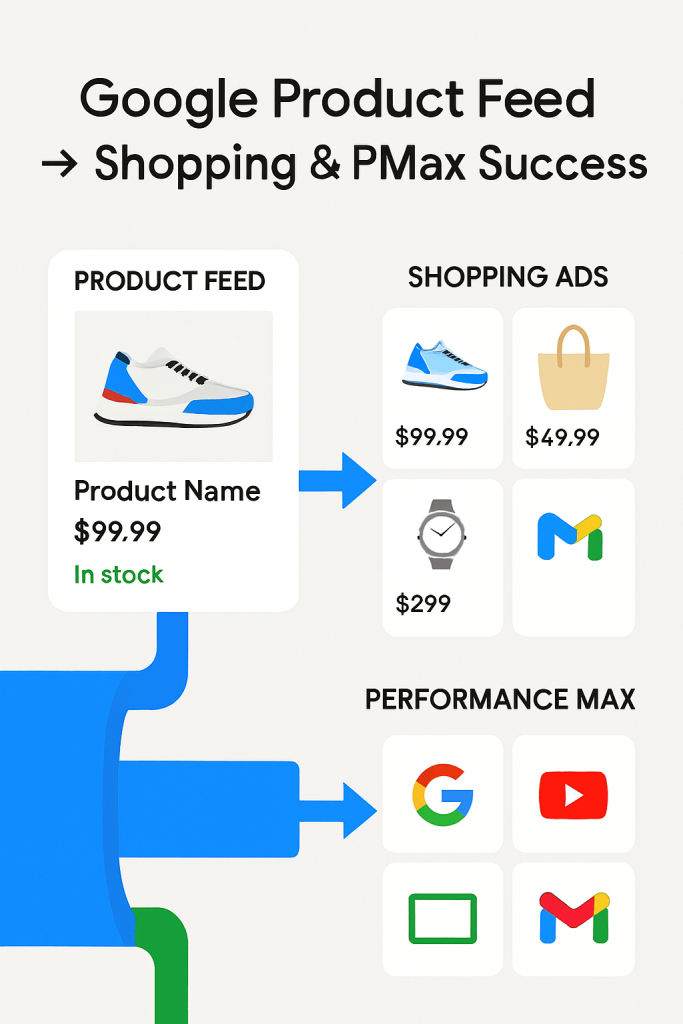
Shopping campaigns read your feed to build product ads. Products from one Performance Max campaign are distributed across various platforms.
The platforms include Search, YouTube, Display, Discover, Gmail and Maps. One feed. Many doors.
Better feed attributes → better matching → lower CPA. Think of attributes as coordinates; they guide Google to the right shopper. Google Help
Brand-exclusion controls are now split. You can keep branded Shopping traffic. At the same time, you can exclude branded terms from Search text ads if you want. Expect a cleaner spend mix. blog.google
So, map feed to campaigns with the following intent:
A . Use supplemental feed or rules for title rewrites by query theme (e.g., add size/color/brand).
B . Segment by margin or lifecycle with custom labels for PMax asset groups.
C . Keep image, price and availability fields current to prevent impression waste. Google Help
What new feed requirements did Google update that sellers must know?
US sales tax fields removed. Merchants no longer need to provide U.S. sales tax attributes/settings in Merchant Center. Less setup friction. Google Help
Measurement terms changed. Merchant Center now refers to key actions on free listings as “key events” (aligned with Google Ads/Analytics). Expect cleaner reporting across surfaces. Google Help
Inventory scope widened. Vehicle ads expanded to include RVs and campers. If you sell a product, your feed can list them. Google Help
Control update for PMax + feeds. With new brand-exclusion controls, you can manage brand terms more precisely.
This is done by ad format, which is helpful if branded Shopping clicks convert better than text ads for your catalog. blog.google
Identifiers still matter. Google again emphasized the importance of GTIN values. They are essential for product eligibility and matching. Without these unique IDs, products may not qualify for certain programs or features. Google Help
Yet, audit before Q4:
Remove U.S. tax settings if still present.
Align reporting to key events.
Add GTINs where missing; target 100% coverage for branded goods.
Use the brand-exclusion split. This keeps branded Shopping terms active. It also directs branded Search budget toward higher-return strategies. Google Help
Extra signal (market):
Regulators are scrutinizing Performance Max. Expect continued changes to controls and disclosures; keep feeds flexible and compliant. Reuters
Improve Your Product Feed for Higher Conversions
So, what are the latest strategies for product feed optimization? Let’s discuss:
1 . Treat the feed as your storefront. Keep price, availability and shipping synced daily; stale data is the #1 disapproval trigger and throttles impressions.
2 . Lean on recent policy changes. US sales tax fields are no longer required in Merchant Center.
3 . Map categories with intent. Use Google product categories that mirror how shoppers search.
4 . Exploit supplemental feeds. Layer titles, attributes and seasonal tags without touching your primary feed.
5 . Structure for Performance Max. Strong feeds + PMax = wider reach. Google reports retailers earning ~5× ROAS with PMax campaigns.
6 . Close the measurement loop. Merchant Center and Google Ads now default to data-driven attribution.
Still, when the conversion rate holds at 2.5%, conversions per 10,000 impressions will rise from 5.0 to 6.5. This is a 30% increase.
How do optimized feed attributes impact ad rankings?
Titles = query match. Attribute-rich titles increase CTR. Formula: Brand + Model + Key Attribute + Size/Count.
GTIN = stronger product match. GTINs link your item to Google’s Shopping Graph. Wikipedia – GTIN, GS1.
Categories = relevant auctions. Correct category mapping trims wasted queries.
On-page parity. Add merchant listing structured data (Product, Offer) for consistency.
Why is it important:
GTINs expand queries by 15%, increasing impressions from 100k to 115k. Refined titles raise the CTR (Click-Through Rate) by 25%, resulting in 2,875 clicks instead of 2,000. With the same CPC, revenue grows without higher bids.
Which mistakes in feed optimization are hurting sellers the most?
1 . Changing product IDs. Wipes history and resets learning.
2 . Missing GTINs. Leads to limited visibility. Google Merchant Center Beginner’s Guide
3 . Price/availability mismatches. Cause disapproval.
4 . Outdated attributes. Keeping US tax fields after July 2025 spawns warnings.
5 . Sloppy categorization. Using generic categories inflates CPCs.
6 . Ignoring attribution hygiene. With DDA default, mis-tagging distorts PMax learning.
Feed Management Challenges: What Are Users Struggling With?
What are the most common problems in feed management across multiple platforms?
Errors and disapprovals. Missing fields or wrong landing pages stop products fast. Ads pause.
Data drift. Prices and stock change constantly. Old exports show wrong info. This hurts trust and causes refunds.
Fragmented sources. Shopify CSV, Content API and PIM exports often differ. Result: duplicates, wrong SKUs, missed promotions.
Scale pain. Thousands of SKUs mean many rules. Manual edits fail easily. Mistakes multiply.
Attribution noise. Poor tracking hides which feed fixes work. Campaigns and feeds learn slowly.
Tool fatigue. Agencies juggle 3–6 tools. Managing them adds stress. BigCommerce — Product Feed Management
Reasoning: Feeds are the engine for ads. Bad fuel slows everything. Good feeds drive results.
How do sellers handle thousands of products with constant updates?
Centralize with a PIM or feed manager. Keep titles, GTIN, price and shipping in one place. Push updates to all channels. Adidas used this to scale efficiently.
Automate hourly or daily syncs. Content API helps push updates fast.
Use templates and rules. Titles, descriptions, colors, sizes, bundles and margins. Apply rules across SKUs.
Segment by priority. Top 10% SKUs get strict monitoring. Others follow bulk rules.
Version and audit. Keep logs. Rollback bad pushes fast.
Measure at the SKU level. Track clicks, conversions and revenue to decide where to focus.
Indeed, updating 10,000 SKUs manually = ~2,000 hours/month. Automation cuts it to ~200 hours/month. That’s a 90% time saving. Of course, centralization changes chaos into order.
Which new workflows are simplifying feed management for brands?
Modern Feed Managers + PIM combos. Tools like Productsup, Salsify and DataFeedWatch clean, map and route feeds. Templates, validations and auto-fixes save work.
AI-assisted mapping and SKU enrichment. Suggests titles, fills missing GTINs and proposes categories. Cuts manual tagging by 40–70%.
Content API-first workflows. Replace FTP/CSV with API pushes. Faster, fewer duplicates.
Automated QA and alerting. Platforms check hundreds of items. Alerts warn about missing GTINs, price mismatches and disapprovals.
Rule libraries & reusable templates. Agencies keep “campaign playbooks.” New clients onboard in hours.
Marketplace connectors. One click to Amazon, Walmart, Etsy and Google. Reduces mapping work.
Integrated measurement links. Export custom labels to campaigns. PMax and Shopping campaigns use the same SKU data.
Merchant Center Feed Updates: What Changed This Year?
Do you know what the difference is between a Merchant Center feed and a supplemental feed? Let’s see the comparison:
Merchant Center feed is the main feed. It holds all required product info: title, price, availability, GTIN and category. Google uses it to approve and show products. Google Merchant Center — Feeds
Supplemental feed adds extra info. It fills missing attributes, adds labels, or seasonal tags. It does not replace the main feed.
Core point: Supplemental feeds only fill gaps. They save editing the main feed.
Update: Google now allows multiple supplemental feeds per main feed. This helps large catalogs handle seasonal changes faster.
Why are sellers asking for clarity on multiple feed types?
Sellers often mix main, supplemental and Google Sheets feeds. This causes confusion.
Discrepancies appear when overlapping data exists. Google flags errors or duplicates.
Merchant Center shows feed conflicts in a separate “Feed Warnings” section. Sellers want clear rules to merge feeds.
How can businesses fix common Merchant Center disapprovals?
Check required attributes. Always include: title, description, price, availability, GTIN, MPN, brand.
Sync feeds. Main and supplemental feeds must not conflict. Update frequently for items that change fast.
Fix landing pages. Prices, stock and shipping on pages must match the feed.
Follow policy rules. Correct flagged items, restricted products, or unclear claims.
Use diagnostics. Merchant Center feed-level alerts show issues. Prioritize high-revenue SKUs.
Apply supplemental feeds smartly. Add missing attributes, labels, or tags instead of changing the main feed.
Automate QA. Some feed managers catch 80–90% of common disapprovals before upload.
Shopping Campaign Feed Questions Every Seller Asks
Performance Max (PMax) depends on the product feed. Every attribute—title, description, GTIN, price—feeds the system.
Wrong or missing info reduces impressions and clicks.
Update: PMax now favors product-level data quality over campaign-level signals.
Why do advertisers debate single feed vs. multiple feed setups?
Single feed: Easy to manage. One source of truth. Fewer conflicts. Works for small catalogs.
Multiple feeds: More flexible. Separate seasonal campaigns, regional pricing, or product groups. Best for large catalogs.
2025 trend: Large brands use 2–3 feeds per Merchant Center account.
The main feed has core products. Supplemental feeds handle promotions.
What are the new campaign strategies for product feed accuracy?
Dynamic remarketing: Ads adjust based on SKU data. Missing info reduces personalization.
Seasonal campaigns: Labels in feed trigger automatic groupings. Example: “Summer Sale” or “Clearance.”
Price-driven campaigns: Price updates trigger bid adjustments. Errors can cost 10–15% of potential revenue.
High-margin focus: Custom labels prioritize high-margin items.
Essential Tips for Recent Success:
Check every attribute: title, description, GTIN, price.
Single feed for small catalogs. Multiple feeds for large or seasonal catalogs.
Use custom labels for seasonal, high-margin, or promo products.
Update feeds daily or hourly for changing SKUs.
Monitor PMax and Shopping dashboards for feed errors.
AI in Google Product Feeds: The Future Every Seller Is Talking About
AI scans product data automatically. A product manager can perform tasks at ease using AI.
It finds missing attributes and suggests titles, categories and GTINs.
AI predicts which SKUs will perform better using historical data.
Still, AI now links directly with PMax campaigns. Feed optimization happens before ads run.
Can AI automatically adjust feed attributes to match search trends?
Yes. AI detects trending search queries.
It updates titles, descriptions and categories.
Seasonal phrases, new keywords and search intent guide the updates.
Improvement: AI can suggest changes hourly for thousands of SKUs. Correct updates on 500 SKUs = ~22% more clicks. Outdated info = 12–15% lost impressions.
What are the new AI-powered tools for feed management and campaign?
Productsup, Salsify and DataFeedWatch now include AI modules. They map, enrich and validate feeds automatically.
AI-linked PMax adjusts campaigns based on feed changes instantly.
Predictive labels: AI flags high-margin or trending SKUs for priority campaigns.
Automated supplemental feeds: AI can generate extra attributes or tags for campaigns.
Are AI systems reliable for supplemental feed creation and updates?
AI is highly reliable for business, but human checks are recommended.
It flags missing GTINs, duplicates and price mismatches.
AI updates thousands of SKUs within hours.
Well-trained AI reduces errors 80–90% versus manual updates.
Closing tips for this year:
Use AI to fix missing attributes, titles and categories.
Let AI adjust attributes based on trending search terms.
Prioritize high-margin or trending SKUs with predictive labels.
Automate supplemental feed creation but review flagged issues.
Monitor dashboards for AI-driven feed changes.
Conclusion
Every title, every price is a gear in motion. Strong gears turn faster, carrying sales forward. A sharp Google product feed performs as a machine that never stalls.
FAQ
How do I set up a Google product feed?
1 . Open Merchant Center Next → gear icon → Data sources. (Google Help)
2 . Click “Add product data.” Pick a method: auto crawl, platform link, file, Sheets, API, or manual. (Google Help)
3 . Set the target country and language. Choose destinations. (Google Help)
4 . If file/Sheets/API: include required attributes: id, title, description, link, image_link, price, availability. Add brand + GTIN or MPN when needed. (Google Help)
5 . Follow image rules. No text or watermarks. Use JPG/PNG/WebP/GIF/BMP/TIFF. (Google Help)
6 . Set fetch. Hosted files and Sheets sync every 24h. You can upload anytime. (Google Help)
7 . Map gaps with “Attribute rules.” Fix titles, categories, or labels at scale. Shopify
8 . Submit. Check “Diagnostics” for errors and warnings. (Google Help pages link from the same section.)
9 . Review can take up to 7 business days; approved items can show within 24 hours. (Google Help)

Aliza Khatun is a Digital Marketing Professional and the founder of DigiGenHub. She has helped various businesses grow their online presence through real-world experience in marketing, branding, traffic growth, and business strategy.
Through DigiGenHub, she shows how to build and grow a business from the ground up using Website Setup, SEO, Branding, Paid Promotion, and smart digital tools.
She also highlights how AI can be used to its full potential to make content creation, automation, marketing, and business growth faster and smarter.
She believes that the right knowledge, modern technology, and the right tools can help any individual or business build a stronger online presence.