
Starting a digital products business might seem complicated at first. When I started my first digital business, DigiGenHub, last year, I didn’t know where to start. Yet, taking that first step mattered most.
Still, “how to start a digital products business.” First, identify your niche. Ask yourself what specific problem you’re solving or what needs to be met. This helps you set yourself apart from others.
Indeed, make a simple business plan. Ask: Why this? For whom? When? Answering these questions clarifies. Indeed, a good plan maps out your goals, audience, and action plan.
So, create a website or platform to showcase your products. This will help attract customers. Next, take care of legal matters to avoid future problems.
Then, make a financial plan. Set prices, track expenses and set revenue goals. This keeps your business on track. Finally, set fair prices for your products or services. So, let’s learn different aspects of launching the most profitable digital products.
How to Start a Digital Products Business
Every tremendous digital product starts with a simple idea. Of course, a perfect idea works most to solve problems or improve life.
But turning that idea into a prosperous business takes more than inspiration. It’s about knowing your audience, building something valuable and meaningfully sharing it with the world. So, let’s learn more about it.
1. Know Your Market
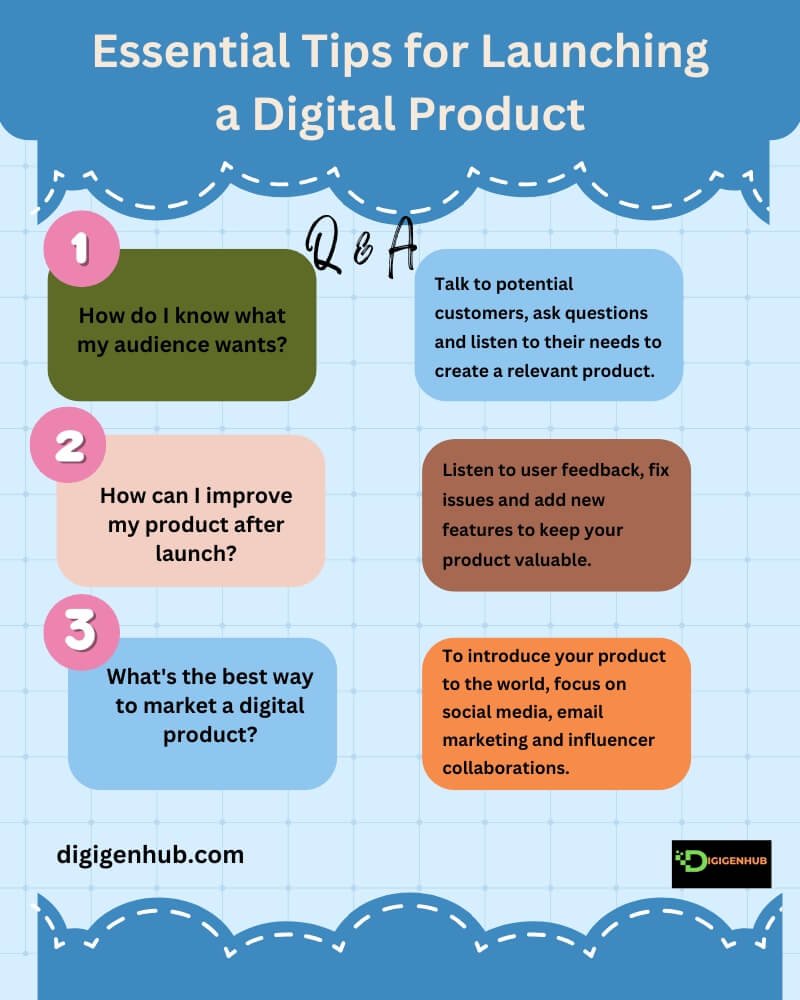
Start by understanding your audience. Talk to people, ask what they need and listen closely. Build something that solves their problems.
Example: Dropbox started with a simple video to gauge interest before building the product.
2. Make a Product People Love
Keep it simple and user-friendly. Test with real users and improve based on their feedback. The more it helps, the more people will love it.
Example: Canva made design easy for everyone, even beginners.
3. Plan Your Launch
Create excitement before you launch. Share teasers, offer early access and let people feel special. A buzz around your product helps it spread quickly.
Example: Clubhouse built excitement by using an invite-only system at first.
4. Use Smart Marketing
Reach your audience where they are. Share helpful content, collaborate with influencers and make your product known.
Example: Duolingo grew by partnering with influencers to share their language-learning fun.
5. Keep Improving
Stay responsive to feedback. Add new features, fix issues and improve with every update. The more value you offer, the more people will stay.
Example: Instagram started with photos, then added filters and stories based on user needs.
6. Choose How to Earn Money
Decide on your pricing model. Offer free basic features or a paid version with more features. Test different options and see what works best.
For example, Spotify gives a free version and charges for premium features.
7. Stay Close to Your Customers
Build trust by being responsive. Answer questions, thank loyal users and show appreciation. Happy users become your best promoters.
Example: Zappos gained loyalty with exceptional customer service.
8. Learn and Adapt
Stay flexible and watch for new trends. Improve your product based on market changes. Keep evolving to stay front by getting ideas from product development firms.
Example: Amazon started small but added new services like Prime and Alexa to stay relevant.
The Necessary Steps to Start digital products to sell
Pick a niche you’re passionate about. Create a product that solves a problem. Choose a platform to sell it, like Etsy or your site. Set a competitive price. Market via social media, email and content. Automate product delivery. Track sales and improve your product and strategy. Let’s learn more from here:
Niche Identification:
Research growing trends using tools like Google Trends. Pick a niche you’re passionate about. The most profitable digital product niches are:
A . Printables for Home Decor: Wall art, quotes and posters for printing.
B . Email Templates: Pre-designed templates for email marketing.
C . Video Templates: Templates for YouTube, Instagram, or promotional videos.
D . PowerPoint or Google Slides Templates: Ready-made presentation designs.
E . Mockups: Digital mockups for showcasing products or designs.
F . Business Tools: Spreadsheet templates for budgeting, invoicing, or project management.
G . Resume Templates: Professional templates for resumes and cover letters.
H . Photo Editing Presets: Lightroom, Photoshop, or mobile app presets.
I . Printable Worksheets: For teachers, students, or coaches.
J . Digital Planners: For organizing schedules, tasks, or goal tracking on tablets or phones.
K . Webinar Templates: Pre-designed templates for conducting online seminars.
L . NFTs (Non-Fungible Tokens): Digital art sold as unique tokens in the blockchain.
M . Social Media Graphics: Templates for creating eye-catching posts and stories.
N . Guides for Software or Apps: Tutorials, cheat sheets, or guides for using popular software.
O . Fitness or Meal Plans: Custom workout or diet plans in digital format.
2 . Create the Product:
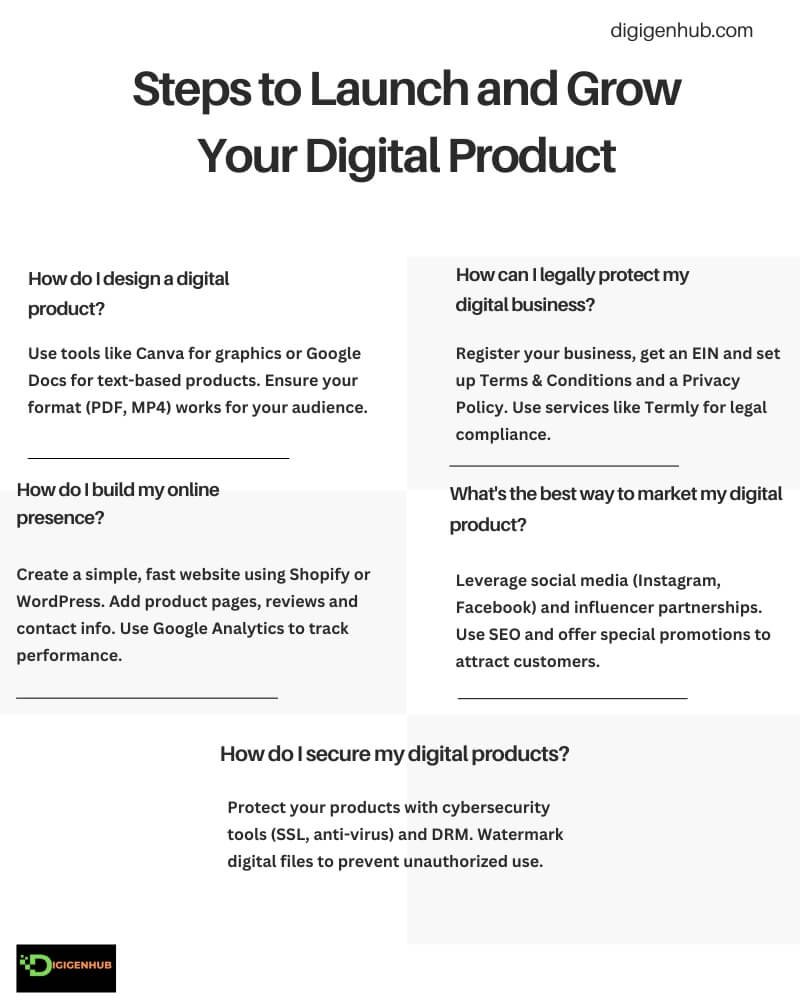
Design your product based on audience needs. Use tools like Google Docs or Canva. Record and edit videos for courses. Save in formats like PDF or MP4 to ensure functionality.
3 . Business Plan:
Then, implement a clear growth plan.
Vision & Mission: Define your long-term goal and strategy (e.g., “Help small businesses with affordable design tools”).
Target Market: Use tools like Google Analytics to identify your audience and their needs.
Competition Analysis: Study competitors on platforms like Etsy or Udemy to find opportunities.
Growth Strategy: Use Facebook ads, Instagram promotions, or offer free resources to attract customers.
4 . Legal Considerations:
You must set up your digital product business to be legally compliant and protected. So, take care of the following legal steps:
A . Business Structure
Pick the proper business structure, such as a Sole Proprietorship, LLC, or Corporation. An LLC is popular for small businesses because it protects assets and offers tax flexibility.
B . Business Registration and EIN
Register your business with the local or state government and get an EIN (Employer Identification Number) from the IRS. You’ll need it for taxes and business transactions.
C . Tax Registration
Know the sales tax rules for digital products. They vary by location. For example, in the U.S., some states like California tax digital products, while others like Oregon don’t. Tools like TaxJar can help you manage this.
D . Permits and Licenses
Most digital businesses don’t need special permits, but you may need an online business license, depending on your location. Check with your local government for details.
E . Terms, Conditions and Privacy Policy
Create Terms and Conditions for your products to protect your business. If you collect customer data, include a Privacy Policy. Make sure you’re following laws like GDPR or CCPA. Services like Termly or Iubenda can help you set this up.
5 . Building an Online Presence:
Your website is your online store. Build it using platforms like Shopify, WordPress, or Squarespace. Keep it simple, straightforward and fast. Include a product page, contact details and an “About Us” section. Use good images and add customer reviews to build trust.
Shopify helps you create and grow your online store. Salesforce helps with customer relationships and marketing.
Google Analytics tracks your traffic and sales. Tools like Zapier, Mailchimp and HubSpot help automate tasks, saving you time. These tools are key to managing and growing your business quickly.
6 . Social Media Presence
Be active on Instagram, Facebook, TikTok and Pinterest. Share helpful content like tips, updates, or customer stories. Respond to comments and messages. Use social media to run special offers or partner with influencers.
7 . SEO Optimization
Optimize your website to rank higher on Google. Use keywords like “digital planners” or “Lightroom presets” on your pages. Tools like Yoast SEO or Google Search Console can help. Ranking higher means more customers.
8 . Mobile-First Design
Make your website work well on mobile phones. Google ranks mobile-friendly websites higher in search results.
9 . AI and Emerging Tech
Use AI tools like chatbots to answer customer questions quickly. Tools like Tidio or ManyChat help set them up. If you sell digital collectibles, you can also explore augmented reality (AR) for product demos or NFTs.
10 . Financial Planning
Create a budget for your digital products. List costs like website hosting, marketing and tools. Accounting software like QuickBooks or Xero can be used to track income and expenses.
Invest in cybersecurity tools (e.g., SSL certificates and anti-virus software) to protect your business. If you accept cryptocurrency, set up a secure payment system with platforms like BitPay.
11 . Financial Monitoring
Monitor your financial performance regularly. Track sales, costs and profits. Tools like Google Analytics and Shopify Analytics can help you track performance and adjust your strategy.
12 . Adapt to Market Conditions
Stay flexible. Adjust your products or marketing if a new trend or technology becomes widespread. Regularly check your financial health to stay competitive.
13 . Launch and Iteration
Promote your product through ads, email campaigns, or webinars. Collect feedback after launch and use it to improve your product. Add new features or updates based on customer needs. Monitor market trends to stay relevant.
14 . Blockchain for Digital Products
Blockchain helps secure digital products and verify ownership. NFTs (Non-Fungible Tokens) help prove ownership of digital art or collectibles. Platforms like OpenSea use blockchain for secure transactions.
15 . Community Engagement
Build a loyal community. Connect with your audience using platforms like Discord, Patreon and Reddit. Patreon lets fans support you with monthly subscriptions for exclusive content. Engage in Reddit communities to get feedback and grow organically.
16 . Customer Support
Use AI chatbots like Zendesk or Drift for instant, 24/7 support. Provide self-service tools, like FAQs, so that customers can find answers quickly.
17 . Analytics and Performance Tracking
Track your performance using tools like Google Analytics. Monitor sales, traffic and customer behavior to optimize your website and marketing strategies.
18 . Security Measures
Protect your digital products. Use cybersecurity tools like Norton or McAfee to guard against hacking. DRM (Digital Rights Management) prevents unauthorized copying. Watermark digital products like art or eBooks to protect them.
19 . Hybrid Business Models
Combine physical and digital products. Offer subscriptions for steady income. For example, sell an online course with a printed workbook. Subscriptions keep your business flexible.
20 . Pricing Strategies
Use modern pricing models like subscriptions for steady income. Dynamic pricing adjusts based on demand. Offer discounts for early buyers or special deals. Microtransactions, which allow small payments for extra features, are typical in apps and games.
Complete Cost Guide for Starting a Digital Products Business
Starting a digital products business is profitable and low-cost. Yet, planning costs matter most. Let’s explain a simple idea to help you:
1. Domain and Hosting
A . Domain Name: $10–$20/year
B . Web Hosting:
Shared Hosting: $60–$150/year
Managed Hosting: $200–$500/year
C . SSL Certificate: Free–$50/year (sometimes included with hosting)
2. Website Development
A . DIY Website Builders (e.g., WordPress, Shopify, Wix): $100–$300
B . Custom Development (if hiring a developer): $1,000–$5,000
C . Themes and Plugins: $50–$500 (one-time or yearly)
D . E-Commerce Integration (if applicable): $30–$100/month
3. Design Tools and Resources
A . Graphic Design Software:
Canva Pro: $10–$15/month
Adobe Creative Cloud: $20–$60/month
B . Stock Images/Videos: $20–$150 (one-time or subscription)
C . Custom Fonts/Templates: $50–$300 (one-time)
4. Product Development
A . Creation Tools:
eBook Writing: Free–$100 (tools like Scrivener, Reedsy)
Course Creation Platforms (Teachable, Thinkific): $300–$1,200/year
Software Development: Free–$500 (frameworks, licenses)
B . Hardware (if required):
High-quality Camera for Content Creation: $500–$3,000
Editing Software (Final Cut Pro, Lightroom): $300–$1,000
5. Marketing and Branding
A . Logo and Branding: $100–$600 (via tools or freelancers)
B . Social Media Ads (Initial Campaign): $100–$1,500
C . SEO Tools (Ahrefs, SEMrush): $100–$300/month
D . Email Marketing Platforms (Mailchimp, ConvertKit): $20–$60/month
E . Content Marketing: $200–$1,000 for freelancers or tools
6. Legal and Business Setup
A . Business Registration: $50–$500 (varies by country)
B . Terms & Privacy Policy Templates: $0–$100
C . Intellectual Property Protections (Trademarks, Copyrights): $200–$1,000 (optional)
7. Recurring Operational Costs
A . Website Maintenance: $10–$50/month
B . Payment Gateway Fees (Stripe, PayPal): ~3% per transaction
C . Help Desk Software (Zendesk, Freshdesk): $20–$60/month
D . Analytics Tools (Google Analytics Pro, Hotjar): Free–$200/month
8. Optional Costs
A . Freelancers for Content/Marketing: $200–$1,000 (project-based)
B . Advanced Optimization Tools: $50–$200/month
C . Premium Plugins or Themes: $50–$300 (one-time)
D . Third-party Platforms (Etsy, Amazon):
Listing Fee: $0.20/item
Transaction Fee: ~5%–10%
9. Advertising and Launch Campaigns
A . Pay-Per-Click Ads (Google, Facebook, Instagram):
Initial Budget: $100–$1,000
B . Influencer Marketing: $100–$1,500
C. Affiliate Marketing Setup: $50–$200 (one-time or recurring)
Yet, this overview helps you organize costs for starting your digital products business.
Conclusion
Starting a digital products business takes planning. Focus on your niche, build your online presence and manage finances. Stay consistent and deliver value. Take the first step and grow your business. Still, building a business takes time, effort and flexibility. Keep learning and adapting and touch the aspired dream.
FAQ
How do I get buyers for digital products?
Focus on your audience. Promote on social media and via email. Show how your product solves their problems. Use ads to reach more people.
What is the best platform to sell digital products?
You can sell digital products on your website using WooCommerce or Shopify, which are both easy to set up. Alternatively, platforms like Gumroad or SendOwl can be integrated with your site for secure sales. These options are reliable and offer good support for digital products.
What is the best strategy to sell digital?
Create a user-friendly website, promote via social media and email and offer valuable bonuses or updates to build loyalty.

Aliza Khatun is a Digital Marketing Professional and the founder of DigiGenHub. She has helped various businesses grow their online presence through real-world experience in marketing, branding, traffic growth, and business strategy.
Through DigiGenHub, she shows how to build and grow a business from the ground up using Website Setup, SEO, Branding, Paid Promotion, and smart digital tools.
She also highlights how AI can be used to its full potential to make content creation, automation, marketing, and business growth faster and smarter.
She believes that the right knowledge, modern technology, and the right tools can help any individual or business build a stronger online presence.